Voice typing for every device you own

Speak naturally.
It types everywhere.

AI voice typing for iPhone, Android, Mac and Windows. Talk into any app and your words land right where you were typing: live as you speak, spelled your way, never rewritten behind your back.

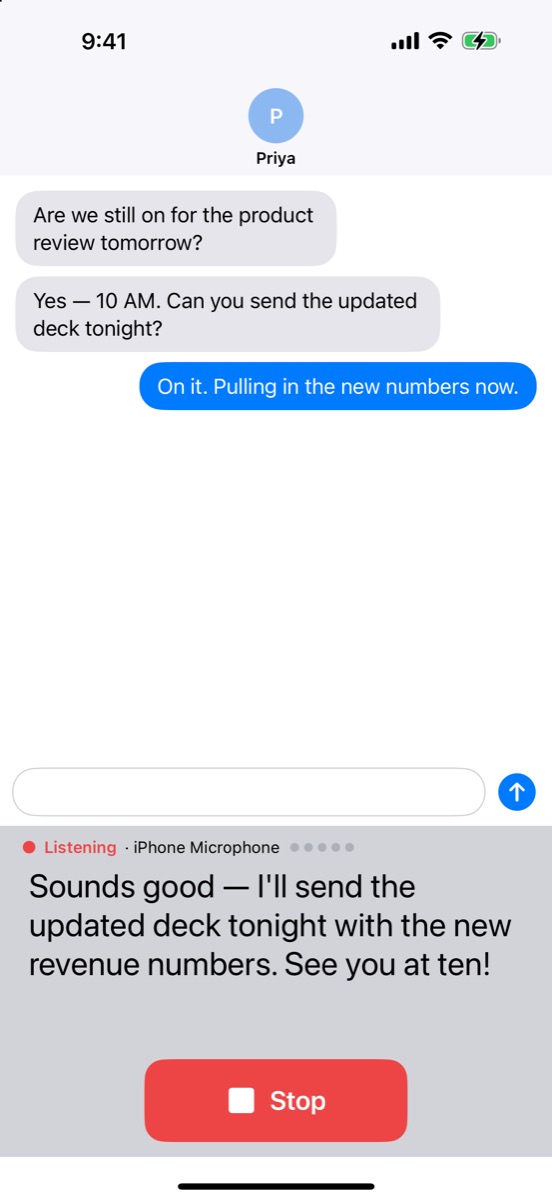
VoiceType for iPhone: tap the mic on the keyboard, in any app.

Works wherever you can type

MessagesMailSlackNotesWhatsAppGmailGoogle DocsOutlookMicrosoft TeamsNotionWordVS CodeLinkedInTelegram
3×

People tend to speak about three times faster than they type. Put that speed to work in every app.

4

Platforms: iPhone, Android, Mac and Windows. One voice-typing experience across all of them.

1

Account. Your vocabulary and dictation history follow you from device to device.

0

Sounds. No chimes, beeps or spoken alerts, so it is safe to use in the middle of a meeting.

How it works

Three steps. Zero typing.

The same simple flow on your phone and your computer.

1

Start talking

Tap the mic on the keyboard, or press a shortcut on your computer: ⌃⇧Space on Mac, Ctrl+Shift+Space on Windows.

2

Watch it appear

A live transcript shows every word as you say it, so you always know you were heard. Pause, think, keep going.

3

It lands where you type

Stop, and your words go in exactly where your cursor was, with names spelled your way and the clean-up switches you have on.

The apps

One voice. Four apps.

A keyboard for your phone, a dictation app for your computer, and one account that ties them together.

VoiceType keyboard showing a live transcript while dictating a message
iPhone · iOS 17 or later

VoiceType for iPhone

The AI voice keyboard for every app: a complete keyboard with swipe typing and emoji search, plus voice dictation that keeps up with you.

  • A live transcript fills the keyboard, then lands where you type
  • Start from Siri, or from Control Center, the Action button or the Lock Screen (iOS 18 or later)
  • The keyboard is free; voice starts with a free week
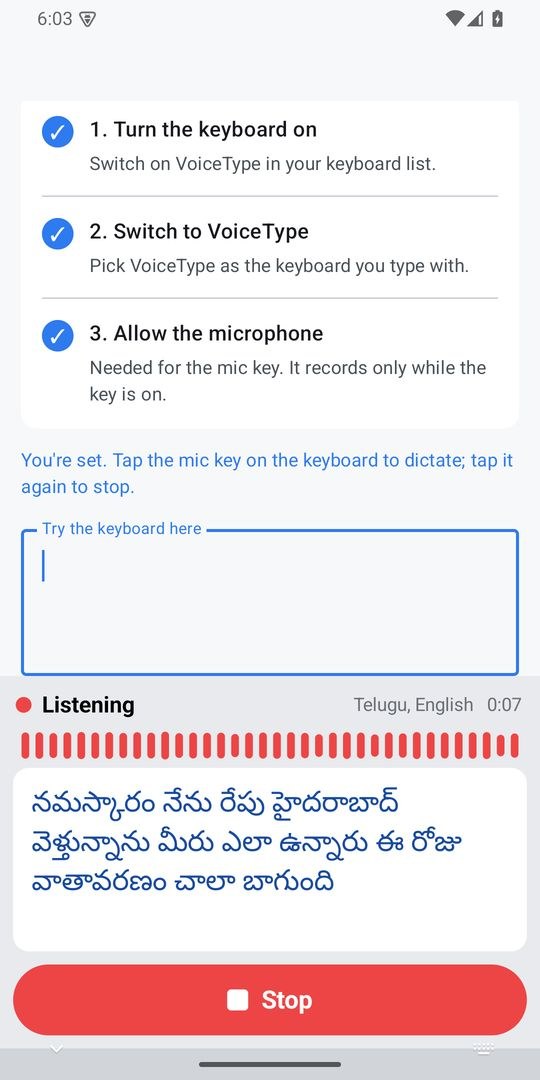
VoiceType for Android dictating Telugu text in Telugu script
Android · Coming soon

VoiceType for Android

Telugu and English, typed or spoken. Type Telugu in English letters and pick the Telugu word, or tap the mic and just talk.

  • Telugu words from English letters, right on the phone
  • A big live transcript with one Stop button
  • Swipe typing, next-word predictions and emoji search

Or write to sharathck3@gmail.com with the Google account on your phone.

Mac · macOS 14 or later

VoiceInput for Mac

Dictate into any app from the menu bar. Hold a shortcut and talk, and a live transcript pill follows along.

  • Works in every app: mail, chat, docs, your code editor
  • Your vocabulary and optional clean-up, each a separate switch
  • Included with VoiceType Monthly, nothing to buy on the Mac

Included with VoiceType Monthly on iPhone ($4.99/month, first week free). Universal: Apple silicon and Intel

Windows · 10 and 11

VoiceInput for Windows

Voice typing in every Windows app, right from the notification area. No installer wizard, no admin prompt.

  • Hold Ctrl+Shift+Space to talk, or Alt+Space for hands-free
  • Live transcript, your vocabulary, optional clean-up
  • Free download that keeps itself up to date

64-bit Windows 10 or 11. Not code-signed yet, so Windows may ask you to confirm: install steps

Why people switch to voice

Built for the way you actually talk.

Fast, accurate and respectful of your words. Every change to what you said is your choice, one switch at a time.

A live transcript you can trust

Every word appears as you say it. Nothing is typed into your app while you are still talking; when you stop, it all goes in at once, right where your cursor was.

Your names, spelled right

Add names, products and acronyms once. They come out your way everywhere.

Clean-up you control

Grammar, vocabulary and tone are separate, visible switches. Tone stays off until you pick one.

It tidies. It never answers.

Ask it to write an email and you get your request, tidied up. Never a reply, never words you did not say.

Never lose a thought

Dictations are saved as you speak, with a searchable history and one-click copy.

One account, every device

Your vocabulary and dictation history follow you between iPhone, Android, Mac and Windows.

Tones, including code

Switch on a tone: Formal, Casual, Coding, or one you write yourself. On the desktop, a code tone turns what you describe into real code.

Silent by design

No chimes, no beeps, no voice. Status shows on screen, never out loud.

Knows what is on screen

On Mac and Windows, the app, the window title and the text on screen go along with a dictation to the clean-up model, so names and terms come out right. Never password fields, and you can switch it off.

Never presses Enter

A long dictation never sends a chat message halfway through. You decide when to send.

Private by design

Your words stay yours.

Voice typing should never cost you your privacy. No ads, no tracking, nothing sold, and what you type on the VoiceType keyboards is processed on your phone.

Privacy in plain words

Typing is processed on your phoneOn iPhone and Android, typing, swipe and autocorrect run on the phone and work offline.

Your voice goes to the speech engineAudio goes to the speech engine set in the app, for the dictations and recordings you start. The phones ask before using cloud AI; on Mac and Windows, cloud speech is on from the start.

No ads. No tracking. Never sold.Your data is not used for advertising and is never sold to anyone.

Delete any timeDelete your account in the VoiceType app on your phone. Recordings, screenshots and tasks made with VoiceInput are deleted when you email us.

Pricing

Simple, honest pricing.

Typing is free. Voice on iPhone is one monthly subscription with a free first week, and it covers your Mac too.

Keyboards

VoiceType for iPhone and Android

Free

Typing, swipe, autocorrect and emoji search. No subscription needed.

See the keyboard
Free first week

VoiceType Monthly

AI voice typing on iPhone, plus VoiceInput for Mac

$4.99 / month

First week free for new subscribers. Cancel any time. Prices vary by country.

Start your free week

VoiceInput for Windows

Voice typing in every Windows app

Free

A free download for Windows 10 and 11 (64-bit).

Get it for Windows

VoiceType for Android: typing is free, and voice dictation will be a subscription with a free first week. Full pricing details

Questions

Good to know.

Which apps does it work in?

Any app where you can type. On iPhone and Android, VoiceType is your keyboard, so it is there in Messages, Mail, WhatsApp, Slack, Notes and everything else. On Mac and Windows, VoiceInput types into the text field your cursor is in, in any app.

Will it change what I said?

Only through clean-up switches you can see. Fixing obvious grammar and custom vocabulary start on (on Android every step starts off), and a tone is off until you pick one; turn any of them off in Settings. Clean-up only tidies what you said: it never answers a question you dictated or writes something new.

How do I get VoiceInput for Mac?

Download it free, then unlock it with VoiceType Monthly ($4.99/month, first week free). In VoiceType on your iPhone, sign in with a Google or email account and subscribe; then sign in to VoiceInput on the Mac with that same account. There is nothing to buy on the Mac.

Does it work offline?

Typing on the keyboards works fully offline. Voice typing with AI needs a connection, and each app also has a built-in recognizer that works on the device. On a Mac with macOS 14 or 15, Apple's recognizer may still use Apple's servers until macOS has its on-device speech model.

When is Android available?

VoiceType for Android is coming to Google Play. Email us at sharathck3@gmail.com with the Google account on your phone to ask for early access.

All questions and support

Stop typing. Start talking.

Pick your device and start talking.

VoiceInput for Mac is included with VoiceType Monthly on iPhone (how it unlocks). VoiceInput for Windows is free; it is not code-signed yet, so Windows may ask you to confirm (install steps).